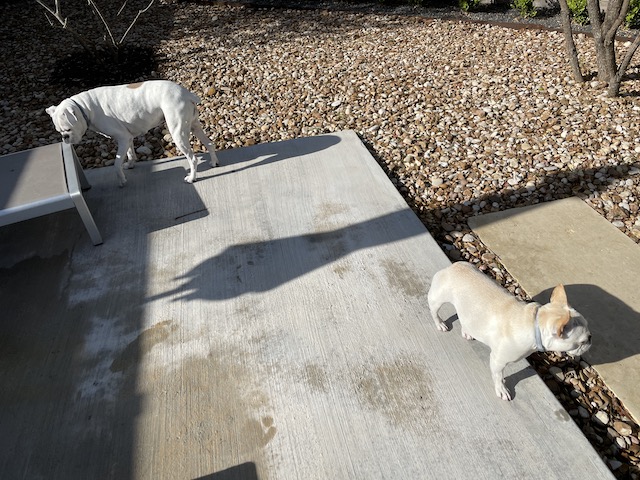
“I think I’m going to take this lounge.”
“Go. ahead but notice there’s no pillow.”
“You’re right. What the heck?”
“Complaints don’t work around here.”
Friday has come. I can’t decide if the week’s been long or short. If you looked in yesterday you know Lucy went to the vet for a teeth cleaning. She is doing well, but needs medication twice a day. If you can picture Lucy sitting still for pills you have the wrong dog. She is great with chewable but needs a dose of peanut butter for everything else. We have two pills that are capsules and one chewable.
I woke up yesterday to the Classic editor being totally shut off. I thought WP was going to continue it for we premium subscribers. Well I was wrong. There was no warning and let me tell you my type of blog with tons of pictures is a real pain in Block editing. I used to be able to download masses photos and now must do it one at a time. On top of that, the captions don’t work well, and oh my goodness what a mess.
I have often threatened to go to the free version of WP if forced to use the Block editor. I’ll give it a bit and see what happens. I wish there was a soul that gave a crap about what we users think but I know such an individual doesn’t exist
Today’s JohnKu talks about being had. I hope you all are blessed with a terrific weekend
Block Editor by John W. Howell (I don’t have my copyright sign or at least I can’t find it) Copyright 2021
Gobsmacked by WordPress,
You would think my blog’s for free . . .
The way they treat me.

Fully agree on the editor issue. Every post I do is now copied from a previous one and reworked. So far, the classic block is still working.
As for tablets: Trevor has a tablet twice daily to help his arthritis and a few ml of liquid pain meds once a day. The tablets are easy to chew and pleasantly flavoured. Like most dogs, Trevor does not do tablets. He has his morning pill ground to powder and mixed with vanilla yoghurt (which he loves) and a very small amount of meat and biscuits; his evening one is crushed and mixed with his pain meds and wet food. No drama. I just make sure the pestle and mortar I use for his meds is kept separate from the one I use for grinding spices.
Have a good weekend.
LikeLiked by 6 people
Hahaha. Yes keep the grinders separate. We have done the motor and pestle routine too. Lucy sniffs out the offending med. The peanut butter works great since she loved it so much. Have a good weekend as well. 😊
LikeLiked by 3 people
I feel your pain. Yesterday, I discovered the same thing when I tried to write a new post. I didn’t have too much trouble with the pictures, but when I went searching for the schedule tab, I inadvertently published the post…oh well. I hope Lucy is feeling better. Have a great Friday!
LikeLiked by 5 people
It is so easy to publish ahead of time, I can’t imagine who set that system up. Thanks, Jill.
LikeLiked by 2 people
Holy crap!! My ability to the use classic editor is gone, too!! No warning, no nothing. I need this like I need a hole in the head. I’m going to bark those WP “people” all the way to Outer Mongolia.
LikeLiked by 5 people
😂 I love that rant, Liz. Made me feel better.
LikeLiked by 2 people
I love your haiku, John, and fear your comment about the Block editor. I only use WP when writing for Story Empire and my turn is next week. I’m tech-impaired and your heads-up tells me, I have a struggle ahead. Hope you figure it out for all the rest of us! Have a great weekend. 😊
LikeLiked by 5 people
I’m trying, Gwen. The only suggestion is to maybe set up a classic block and do the post in word and copy it into the block. I’m going to try that today and see how it works. I’ll let you know. 😁
LikeLiked by 2 people
It looks like I still have my classic but probably not for long, lols. I feel your pain, John. Great Haiku!
For the copyright symbol … on a mac it’s Alt + G …I can’t remember how to do it on a PC, sorry. Sending hugs accross the miles! Have a lovely weekend with all your girls. Mmmm, I wonder if I can start taking all my pills with peanut butter?!?! 🙂
LikeLiked by 4 people
I have a Mac so alt g works for me. Thank you, Harmony. What a piss this is. Maybe you could take your pills with gin. Much better than peanut butter. I have a fist full and have often thought about that solution. Hugs across the pond. 🤗 I wish for you a peaceful weekend.
LikeLiked by 3 people
Once again I’m having trouble too, John. I had to delete my Spam one at a time, the comments are like a mass of print, I have to carefully look for the ‘reply’ and ‘approve’. I’m petrified to try and put my next post together. If they want me to quit using wordpress, why don’t they just say so?!!!
LikeLiked by 4 people
GP — look at my comment to John, just below yours.
LikeLiked by 4 people
Thank you very much for taking the time to help out, Linda!!
LikeLiked by 4 people
Yes indeed. Linda’s a saint if you ask me.
LikeLiked by 2 people
I feel the same way, GP. I could not believe it. I had all the photos of Lucy and Twiggy and then had to figure to how to get them into a post. I’ll tell you I had a neckache from hell once I was finished. My Grammarly doesn’t work, so now I broadcast to the world how really idiotic I am. Well, I’ll just have to suck up my pride and go forward. Maybe a note from WP telling me to get lost might be the humane thing to do. This is torture. (Thanks for listening GP.) 😳
LikeLiked by 2 people
No problem. I’m just glad I already decided to go down to one post a week. It’ll probably take me that long to get one together!! 🤪
LikeLiked by 2 people
Here’s how to get it back GP.
Open your WP, click on your face (or whatever image you use) in the circle at the top right in the black bar. Right beside the bell.
Once you have clicked there, it will bring you to your profile. On the left side, choose account settings.
Scroll down until you get to Interface settings and there is a slide bar under Dashboard Settings. Click on that, go below the colour options and save.
Then, you will have the same admin page as before. Just like the last time when they pulled this nonsense! You can then click on posts and then add new and choose classic.
LikeLiked by 2 people
I’ll give it a try. The last time I did that, there were no Dashboard settings for me to click on.
LikeLiked by 3 people
Uh oh. Well good luck.
LikeLiked by 2 people
All is not lost. Here’s a link with instructions on how to return to the old wp-admin navigation sidebar. It worked for me.
Once you’ve done that, here’s how to post and edit in the Classic editor (at least, it’s working for me, and for those I’ve recommended it to).
On the Admin sidebar menu, hover above the third icon down — the little pushpin that’s labeled “Posts.” At that point, DO NOT click on “Add New.” That will take you to the Block editor. Instead, click on “Posts” or “All Posts.” That will open a page with another “Add New” link at the top, with a drop-down arrow next to it.
Click on the arrow, and you have a choice between the Block editor and the Classic editor. Click “Classic,” and you’re in business!
Notice, too, that when you get to the page that shows all your posts, both published and draft, if you hover over a title, you can choose to edit in the classic editor. That option’s right below the title.
Once I got it down, it’s easy as can be. Since I post so often, I leave that “All Posts” page open in my browser as a tab. All I have to do is click on it, and I’m ready to go.
I hope that makes sense, and is helpful.
LikeLiked by 7 people
That first link didn’t work for me. Try this one.
LikeLiked by 3 people
Still didn’t work but I’ll keep trying. Thanks, Linda. 😊
LikeLiked by 2 people
That is the weirdest thing ever. I wonder if theme makes a difference. No matter. What’s important is finding a solution!
LikeLiked by 3 people
Dale’s solution worked. I think having a save button was the key. If you have the button just refreshing the page doesn’t work. Thanks for your help though.
LikeLiked by 1 person
That is how I used to work, Linda. The link you sent me takes me right to the new sidebar. So, let me hunt around and see if I can find another way. Thank you for taking the time to help. 😁
LikeLiked by 1 person
Glad I went down the list… I was just about to give the same instructions to John 😉
LikeLiked by 5 people
The first time I tried it, it didn’t work, but I suspect that was due to ‘operator error.’ Once I found the account settings through the new admin menu, I was able to make the changes.
LikeLiked by 3 people
Woot!
LikeLiked by 3 people
Linda and Dale. Sainthood awaits you.
LikeLiked by 2 people
Thanks, Dale.
LikeLiked by 2 people
John, my blog is free as I keep down the number of pictures in the file. They still hint I need to pay but I know better. Darn if I’m going to pay when I don’t write my own material for now. There are some things with WordPress that haven’t worked well for some time. I ignore them and find ways around them. All the best in your battle for justice. —- Suzanne
LikeLiked by 4 people
Thank you, Suzanne. 😁
LikeLiked by 2 people
I have battled with WP over captions for almost two years, John. I still have to use classic blocks for photos. Premium users get treated a little less badly than free.
LikeLiked by 4 people
That is for sure, Dan. Thanks.
LikeLiked by 2 people
Realizing change was inevitable, I went to the Block Editor with the new blog. The transition wasn’t too bad because my posts are relatively simple. Besides, I do not draft or write in the editor. Have a good weekend … and hoping Lucy continues feeling better. After all, the Little One is ready to play.
LikeLiked by 5 people
She is almost 100% today. We love that. Thanks, Frank
LikeLiked by 1 person
Once I adapted to the new editor, I found I liked it better. I didn’t know they’d be changing the dashboard, though. That happened to me yesterday without warning, and I loathe it. I guess I’ll figure it out.
Sorry about Lucy’s medicine. My dogs always found ways to spit theirs out, too. Even around cheese or PB. Clever guys. I hope you have better luck with Lucy.
LikeLiked by 4 people
I find that if I hide the pill in peanut butter and then put more on another finger which I put neat her mouth right after the pill she doesn’t notice the pill. She is swept up in peanut butter bliss. Thanks, Staci.
LikeLiked by 2 people
Life is no better on the free side. Mine all changed a week ago and it sucks. Fortunately, you and I have access to some wonderful folks who’ve figures some of this out. I’ve been using the block editor to create new posts. I miss the old editor for fancying them up.
LikeLiked by 4 people
Yes indeed. If I only had text I wouldn’t care but when you add photos I would say it doubles the work.
LikeLiked by 2 people
It’s a problem, for sure. I get that systems have to be updated as tech marches along, but it seems like they created some self-satisfying thing that doesn’t serve their users.
LikeLiked by 2 people
open your WP, click on your face (or whatever image you use) in the circle at the top right in the black bar. Right beside the bell.
Once you have clicked there, it will bring you to your profile. On the left side, choose account settings.
Scroll down until you get to Interface settings and there is a slide bar under Dashboard Settings. Click on that, go below the colour options and save.
Then, you will have the same admin page as before.
LikeLiked by 2 people
good to know, thanks.
LikeLiked by 3 people
It worked. You could make a post about that.
LikeLiked by 3 people
Marcia already has. Glad it worked.
LikeLiked by 2 people
I haven’t made a post yet this week, so I didn’t know about the classic editor going away. Every time I try the blob text is a mess. It’s so frustrating and ungainly. I heard that WordPress bought the program and that’s why they’re sticking to it. Pride and money stopping them from listening to the complaints. At least allow for both versions to exist and give us choices.
LikeLiked by 4 people
Somewhere there is a person who is responsible for this mess. I’d love their home number.
LikeLiked by 1 person
Same thing happened to me with classic editor in October – no warning at all. It didn’t take as long as I’d expected to learn Gutenberg – once I quit shouting obscenities and actually did something about it, lol. Good luck, John!
LikeLiked by 3 people
Hi John – oh no that’s such a pain. It is hard to adjust to new formats, etc. I just noticed on this blog (a free one) that I no longer have a dashboard. I hate that. I like to look at my Site Stats and now I can only see a summary. I still have a dashboard on Book Club Mom (also free). I was thinking of upgrading Books To Pen. I wonder if I’d get my dashboard back if I did? I can’t use the Classic Editor on this one. It’s been an adjustment.
LikeLiked by 4 people
Not sure about the dashboard, Barbara. You’ll have to ask the creatons at WP. You’ll find them in the basement somewhere.
LikeLiked by 2 people
Yeah, super annoying…
LikeLiked by 3 people
OK.. John, open your WP, click on your face (or whatever image you use) in the circle at the top right in the black bar. Right beside the bell.
Once you have clicked there, it will bring you to your profile. On the left side, choose account settings.
Scroll down until you get to Interface settings and there is a slide bar under Dashboard Settings. Click on that, go below the colour options and save.
Then, you will have the same admin page as before. Just like the last time when they pulled this nonsense! You can then click on posts and then add new and choose classic.
As for this post… I feel your pain! It was a long-short week for me too!
LikeLiked by 7 people
OMG, Dale!!! You are my hero for all time!!! It worked! (So far.) Why do they do things like this? I’m OOOOOOLD. I don’t like change very much. It gives me palpitations. Don’t they know I could keel over from shock???
Okay, maybe it wouldn’t kill me, but I spent yesterday in a state of what my husband calls extreme pisstivity. (Excuse the language.) I’m now singing and dancing, and heading off to do this on my public blog, too. (I tried it out on my private one, just in case it went even farther off course just to spite me for all my complaining yesterday.)
THANK YOU SO MUCH!! *happy sigh*
LikeLiked by 5 people
Yay Marcia! So very glad it helped!
I LOVE pissitivity. I am so using that from this day forward.
And WordPress are total A-holes for doing this to all of us writers who are NOT looking to bang our heads against the wall in an attempt to write a bloody story…
You are very welcome! Spread the word! 😀
LikeLiked by 5 people
🤗
LikeLiked by 2 people
I’ve already copied your instructions and emailed them to several people, and I think I’ll do a post about it on The Write Stuff later this afternoon. I KNOW there were a whole lotta angry folks yesterday. Bad enough to do it at all, but do it with no warning? Not cool. Not at ALL cool! Feel free to use Mark’s expression. He omits that second “i” but either way, it gets the point across, doesn’t it? 😀
LikeLiked by 4 people
😊
LikeLiked by 1 person
Dale, I plan share your instructions on my blog, The Write Stuff, as I know plenty of people woke up to a horrible shock yesterday. I’ll also include the link to your blog at the end, as well, so that some new folks will stop by for a visit there, as well.
LikeLiked by 4 people
Perfect. I’ve added the I to make it pissitivity!
LikeLiked by 3 people
😂
LikeLiked by 2 people
My hero too.
LikeLiked by 1 person
I had neck ache from hell. I did two posts in Block and hated every moment.
LikeLiked by 2 people
So glad you no longer have to . . .
LikeLiked by 3 people
Thanks to you.
LikeLiked by 2 people
I curtsey…
LikeLiked by 3 people
I grovel.
LikeLiked by 2 people
LOL! Stop it!
LikeLiked by 3 people
Hahahaha.
LikeLiked by 2 people
It worked, Dale. You are wonderful. 🤗
LikeLiked by 2 people
Love the haiku, John! And you aren’t alone in finding a NIGHTMARE awaiting you upon rising yesterday morning. I’m so mad I could spit. Fire. Yeah, I could spit fire! They SAID we’d have the option until 2022. I’d checked numerous times, and was thinking I still had time to learn the block editor. But no. (There’s an old movie line from Joe Pesci about what they do to you at the drive-thru. For some reason, it keeps running through my mind, but I shall be a lady (snort) and not repeat it here.)
If you think adding images is a pain, try having a private blog where you share chapters of your current WIPS with beta readers. 3,000 word chapters with lots of dialogue and therefore, lots of paragraphs. (Would you believe SIXTY?) And each one has to be formatted separately if you want BLACK text, BOLD, and slightly larger than default. Which I do, because I have trouble reading the tiny little print, otherwise. I thought I would lose my mind. WHY is there no “Select ALL” options, except within a block. And why can’t you have more paragraphs within a block???? Doing a short blog post is doable, though not fun, but doing a full book chapter is the stuff of nightmares!
I know exactly how you felt yesterday. And probably still feel today. OH, by the way, you can get the “Classic Editor Plug-In” but only if you convert to a business blog for $300. I’m so mad, I’m considering it, even though I do not intend to sell my books from my blog. And I guess that’s what they wanted.
End of rant. Still love me some Lucy and Twiggy, and I do hope Lucy feels better and will soon be done with her meds. 🙂
LikeLiked by 3 people
Go to Dales Comments below. I did her system and it worked
LikeLiked by 3 people
Did that a couple of hours ago as soon as I saw it, and have thanked her here. I’m also planning to do a post with her instructions today on The Write Stuff, to lessen the number of folks still tearing their hair out. She was a life saver!!! 🙂
LikeLiked by 4 people
😘🤗
LikeLiked by 3 people
Click here if you would like a tall glass of sand to wash down your pain pill for the new block editor. Click harder. It really is a great new feature. No really. Sorry our happiness engineers are busy choking on sand and peanut butter. Click here to break out a bottle of commiseration sauce. Don’t forget to click harder. Oh don’t forget to pick up Toto and click your heals together three times.
LikeLiked by 6 people
Very soothing, John
LikeLiked by 1 person
Sorry the empathy of the WP hippieness engineers just swept me off my feet. Good luck with the battle.
LikeLiked by 3 people
It is won. We have figured it out. In case you want to do the same here is the process. Open your WP, click on your face (or whatever image you use) in the circle at the top right in the black bar. Right beside the bell.
Once you have clicked there, it will bring you to your profile. On the left side, choose account settings.
Scroll down until you get to Interface settings and there is a slide bar under Dashboard Settings. Click on that, go below the colour options and save.
Then, you will have the same admin page as before. Just like the last time when they pulled this nonsense! You can then click on posts and then add new and choose classic.
LikeLiked by 2 people
You are not alone, John. I struggle with the block editor too. Far preferred how WP used to deal with images. However, they’ll probably change it again at some point, maybe even for the better. My dog also loves peanut butter.
LikeLiked by 5 people
See above…😉
LikeLiked by 3 people
I sent it to him and Boyack
LikeLiked by 2 people
Perfectomundo
LikeLiked by 3 people
open your WP, click on your face (or whatever image you use) in the circle at the top right in the black bar. Right beside the bell.
Once you have clicked there, it will bring you to your profile. On the left side, choose account settings.
Scroll down until you get to Interface settings and there is a slide bar under Dashboard Settings. Click on that, go below the colour options and save.
Then, you will have the same admin page as before.
LikeLiked by 1 person
I’m so glad it did!
LikeLiked by 4 people
😁 me too.
LikeLiked by 2 people
🙂
LikeLiked by 3 people
Oh, dear, I’ll have to check WP later (I’m on my iPad and do not post from the WP app, only read and comment). I’ve been using the block editor because I didn’t see that I had a choice. It’s clunky and overkill for the kind of posts I write. I don’t know why WP thought block editor would be great. It’s not user friendly. However, I’ve been getting used to it bit by bit. Of course, I only post about once a week, so my WP frustration threshold has not yet been breached 😉 Glad to “see” that Lucy is better. Have you tried to pill a cat lately? Years ago we had a small cat, Elodea, who had jaws of steel. It would take two of us to pill her: one to hold her and the other to pry open her jaws and push the pill in. She couldn’t be fooled by putting the pill in a pill pocket or mixing with food. She’s no longer with us, but I’ll never forget the ordeal of pilling her 😬 Happy Friday, John!
LikeLiked by 5 people
Yes on the cat. I had a technique that was a thumb to the back of the cat’s jaw and then slipping the pill in. I have had many punctured thumbs. If you want to get to classic here is a way. Open your WP, click on your face (or whatever image you use) in the circle at the top right in the black bar. Right beside the bell.
Once you have clicked there, it will bring you to your profile. On the left side, choose account settings.
Scroll down until you get to Interface settings and there is a slide bar under Dashboard Settings. Click on that, go below the colour options and save.
Then, you will have the same admin page as before. Just like the last time when they pulled this nonsense! You can then click on posts and then add new and choose classic.
LikeLiked by 2 people
Thank you, John!
LikeLiked by 1 person
Oh, no, John! I had not checked in to my blog for a few days and everything has changed. Before I could still use Classic but it is gone. I hate the Block editing too when I tried it. Ugg! I see in the comments that there were some work-arounds. Will try some -thanks to those who gave advice. Gobsmacked by WordPress indeed!
LikeLiked by 4 people
Here is the work around Jo. Open your WP, click on your face (or whatever image you use) in the circle at the top right in the black bar. Right beside the bell.
Once you have clicked there, it will bring you to your profile. On the left side, choose account settings.
Scroll down until you get to Interface settings and there is a slide bar under Dashboard Settings. Click on that, go below the colour options and save.
Then, you will have the same admin page as before. Just like the last time when they pulled this nonsense! You can then click on posts and then add new and choose classic.
LikeLiked by 2 people
Thank you for the mention, Marcia.
LikeLiked by 1 person
I was not impressed when forced to use this block editor this week.
LikeLiked by 4 people
In the comments section on this post under Dalectables is the solution.
LikeLiked by 1 person
That stupid block editor is cheesing off many of us (and I tried twice to go with it but reverted back since I thought I’d lose my mind or hurt someone). You should be able to revert by clicking on site settings, tab over to writing (on my site I am set up with default setting rather than block editor). Hope it works for you. Otherwise you can contact WP and express your displeasure. They may be able to get you fixed up. Rotten jerks. Ear scritches for sweet Lucy and hope she feels better soon.
LikeLiked by 4 people
She is feeling great, Monika. Thanks for the help. Dale Rogerson gave me the solution.
LikeLiked by 2 people
Outstanding. Miss Dale, she’s something isn’t she?
LikeLiked by 3 people
She is.
LikeLiked by 2 people
I’m glad Lucy is recovering well. As far as WordPress, we’ll adjust, and about the time we figure it out, they’ll change it again. 🙂 Happy Friday, John.
LikeLiked by 5 people
There is a work around
LikeLiked by 2 people
I was frustrated with the new editor as well John. Pulling my hair out in fact. Then I vented on Twitter and a lovely woman by the name of Janet Emson taught me how to get the old editor back. I will be forever in her debt. I can send you the instructions John if you want.
LikeLiked by 4 people
Thak you, Lynne. 😁
LikeLiked by 1 person
Best wishes for the dog, John. Our dog, Daisy, hated taking Brevecto until she was out on a gastrointestinal prescription can food, Royal Canine Lo-fat (she’s been having stool problems for two months and it’s been challenging to find a solution). She loves the canned food and she takes her pills eagerly when we give it with the food. We make a ‘meatball’ and squish the pill into it. As for classic editor, what is the problem. Whenever I start a new story, it gives me the Block style but I can switch to the Classic, then back again.
LikeLiked by 4 people
Your turn is coming. One morning you’ll wake up and the Classic button will be gone along with all the classic functionality. When that happens send a note and I’ll bail you out.
LikeLiked by 3 people
You bet. Now, back to my book, Team of Rivals, then to bed. Have a great weekend.
LikeLiked by 3 people
You as well, Steve. 😁
LikeLiked by 1 person
Excuse my French here Boss, but fucking A. They can mess with me all they want, but you? Nope . . not having it.
I hope Lucy is doing okay. No doubt you stocked up on the peanut butter . . .
LikeLiked by 4 people
Got it all back to Classic. Dale taught me how.
LikeLiked by 3 people
She is the best.
LikeLiked by 3 people
She is.
LikeLiked by 2 people
Seriously? I have the ‘big bucks’ plan, too. So if there’s a way to get back to the Classic, please let me know.
LikeLike
Here is how to get it back, Jennie,
Open your WP, click on your face (or whatever image you use) in the circle at the top right in the black bar. Right beside the bell.
Once you have clicked there, it will bring you to your profile. On the left side, choose account settings.
Scroll down until you get to Interface settings and there is a slide bar under Dashboard Settings. Click on that, go below the colour options and save.
Then, you will have the same admin page as before. Just like the last time when they pulled this nonsense! You can then click on posts and then add new and choose classic.
LikeLiked by 1 person
I will do this first thing in the morning. Thank you, John!
LikeLiked by 1 person
😊
LikeLiked by 1 person
Done!! Hooray!!
LikeLiked by 1 person
😁
LikeLiked by 1 person
Well, now I’m not sure I want to post anything. This feels par for the course for me. When I finally figure out how to use something (this covers most technologies), an “upgrade” forces me back to square one.
LikeLiked by 4 people
The way of life, Pete. 😁
LikeLiked by 2 people
I found and posted a workaround to the loss of the editor. I am not sure how long it will be around but give it a shot. It worked for me.
LikeLiked by 5 people
Thank you so much, Maggie. Yes this is the system that we found too. I hope it stays. 😁
LikeLiked by 2 people
I saw the writing on the wall last year and switched over to the block editor. It definitely has a learning curve, but I’ve figured out with some help here and there via tutorials how to do what I need to do. I hope they don’t change it again too soon!
Diva Dog loved peanut butter and cream cheese so we’d use those to get her to take her pills. It made it easier for us both.
LikeLiked by 5 people
Peanut butter is the best, Deborah. I think you are wise to get on the block editor. Unfortunately for me it doubled my work because of so many photos.
LikeLiked by 1 person
I hope you figure it out and don’t have too much stress over the editor change at WP!
LikeLiked by 2 people
All figured out. Got Classic back.
LikeLiked by 1 person
Sweet!😀
LikeLiked by 1 person
Yup.
LikeLiked by 1 person
I was spitting feathers… and speaking in tongues.. thanks to Dale, you and Marcia for passing along the fix.. I have mine back now and long may it last…have a good weekend..hugsx
LikeLiked by 4 people
Great news. 😁 I did two posts with that Block editor and had a neck ache that reached New Jersey.
LikeLiked by 1 person
♥
LikeLiked by 2 people
John, your instructions for keeping Classic Editing worked!!! Thank you so very much! I think I will keep blogging even if I don’t post very often these days. Have a good weekend!
LikeLiked by 4 people
I’m so glad. Keep on blogging (as much as you want) Happy Weekend, Jo.
LikeLike
Great Post 👍
LikeLiked by 1 person
Thank you. Best wishes.
LikeLike
😊😊
LikeLiked by 2 people
Oh, Fridays after Dentists are never easy, dear John! I have read how to return back to the Classic Editor. Thank your friends very much! Hurrah! 🙂 🙂 🙂
LikeLiked by 3 people
I am glad you got your Classic back, Dear Maria. 😊
LikeLiked by 1 person
Oh! What a joy, dear John! Last days it was a nightmare! 🥂🍨
LikeLiked by 1 person
I know I lived through it as well. Maybe it won’t happen again but if it does the fix is here.
LikeLiked by 1 person
It has been a common trial for everybody, dear John! Thank you again! ☕
LikeLiked by 1 person
😁
LikeLiked by 1 person
My classic editor was shut off a few days ago. No heads-up, just boom! I haven’t adjusted at all. If you have a different blog site, I will jump ship with you, John. Gulp!
LikeLiked by 3 people
I sent you the work around. We are safe for now.
LikeLiked by 1 person
Whew!
LikeLiked by 1 person
often wondering too, if anyone from WP-creators really cares how it feels to run the blog on messy Block editor. Each update is worse than previous, they make our life more complicated…
LikeLiked by 3 people
Here is a way to stay with Classic
Open your WP, click on your face (or whatever image you use) in the circle at the top right in the black bar. Right beside the bell.
Once you have clicked there, it will bring you to your profile. On the left side, choose account settings.
Scroll down until you get to Interface settings and there is a slide bar under Dashboard Settings. Click on that, go below the colour options and save.
Then, you will have the same admin page as before. Just like the last time when they pulled this nonsense! You can then click on posts and then add new and choose classic. 😁
LikeLike
Someone in WP is justifying their job by building useless features. They always have to tinker. If it works, just leave it alone. 😦
LikeLiked by 3 people
I think so. Thanks, Mark
LikeLiked by 1 person
Yup! The block editor is a disgrace. The saving ‘grace’ for me…I am currently doing less writing than I’d like to 😦
LikeLiked by 3 people
Here is a workaround if youwould like to go back to classic.
Open your WP, click on your face (or whatever image you use) in the circle at the top right in the black bar. Right beside the bell.
Once you have clicked there, it will bring you to your profile. On the left side, choose account settings.
Scroll down until you get to Interface settings and there is a slide bar under Dashboard Settings. Click on that, go below the colour options and save.
Then, you will have the same admin page as before. Just like the last time when they pulled this nonsense! You can then click on posts and then add new and choose classic.
LikeLiked by 2 people
Thanks John. Will give it a go.
LikeLiked by 1 person